

"Vibe coding" is the word of late 2026. You describe an app in plain language, an AI agent builds it, and you steer by feel — by the vibe — rather than by writing every line yourself. It sounds like magic, and sometimes it is. It is also, right now, GitHub's fastest-growing category: agent-skills repositories gained 6,792 stars in the week of 9–15 November 2026 alone, with projects like Superpowers and Cursor plugins leading the surge. Developers are not just playing with vibe coding any more. They are building systems around it.
This article explains what vibe coding really is, where it breaks, and the one idea that makes it reliable: AI agent skills.
What vibe coding actually means
Vibe coding is not "AI writes all your code". It is a workflow:
- You describe the outcome in plain language — the feature, the page, the fix.
- An AI coding agent (Claude Code, Cursor, Copilot agent mode) reads your project, plans the change, writes the code and runs the tests.
- You review the result like a teammate's pull request, correct the direction, and iterate.
The human moves up a level: from writing syntax to deciding what to build, what good looks like, and what must never break. That is the whole point — and it is also where most people go wrong.
Where vibe coding fails
The failure mode has a name now: hallucination drift. The agent starts confident, makes a reasonable choice, then builds on that choice for ten more steps. By the end, the code works in the demo and fails in production. The usual causes are boring, not mysterious:
- No context. The agent was never told the stack, the conventions, or which files are off-limits, so it guesses.
- No verification. Nobody ran the tests, the type-checker, or the app itself before accepting the change.
- No boundaries. One prompt tried to do five things, so the agent did all five badly.
- No memory. Every session starts from zero, so the same mistakes get corrected again and again.
If your vibe-coded project feels like a house of cards, it is almost always one of these four.
Hallucination drift is not a model bug you can wait out. It is a workflow bug — and workflows can be fixed.
AI agent skills: the missing piece
An AI agent skill is a small, reusable package of instructions that teaches an agent how to do one job well — a skill for writing tests, a skill for reviewing security, a skill for following your project's conventions. Instead of pasting the same long instructions into every prompt, you install the skill once and the agent loads it whenever the task matches. That is why the category exploded in November 2026: skills turn a generic agent into a specialist, and they are shareable, versioned, and reviewable like code.
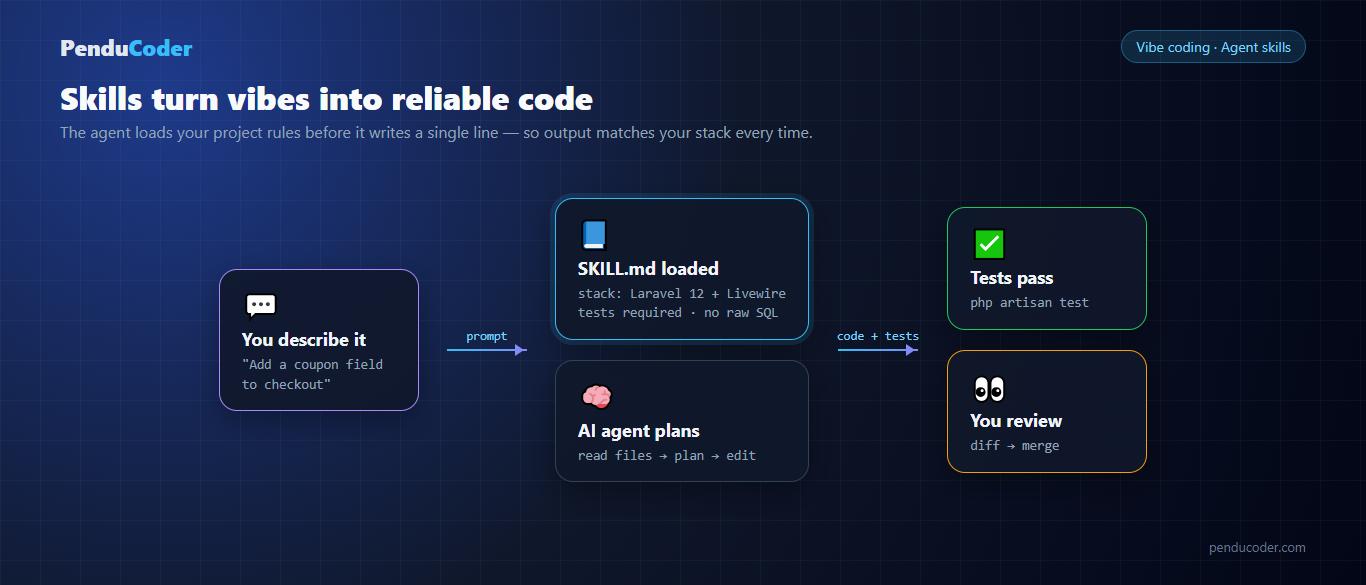
A practical setup looks like this:
- A project skill file (
CLAUDE.md,.cursorrules, orAGENTS.md) at your repository root: stack, versions, folder layout, naming rules, and a short "do not" list — do not install packages without asking, do not touch generated files, do not write TODO comments. - Task skills for repeatable jobs: one for "add a feature" (plan first, then implement, then run tests), one for "fix a bug" (reproduce first, then fix, then add a regression test), one for "review code" (check security, then correctness, then style).
- A verification habit: every agent change ends with the same receipt — what changed, which tests ran, and what is still untested.
A vibe-coding workflow that works
- Write the goal in one paragraph. What should be true when the work is done, and how will you check it?
- Let the agent plan first. For anything bigger than a small fix, ask for a plan before any code. Review the plan — it is much cheaper to fix a plan than a codebase.
- One task per prompt. A single outcome, with a definition of done: "the test command passes and the login page shows the error message".
- Run it yourself. Tests, type-checker, and a manual click-through. Paste the actual error output back if something fails.
- Review like a pull request. Read the diff. If you cannot explain a line, ask the agent to explain it — or delete it.
Example: a project skill file you can copy
Here is a short, real-world style instructions file for a Laravel project. Save it as AGENTS.md (or CLAUDE.md for Claude Code) in the repository root and every agent session starts with the right context:
# Project: Course platform (Laravel 12, PHP 8.3, MySQL 8, Livewire 3)

## Commands
- Run tests: php artisan test
- Code style: ./vendor/bin/pint
- Never run migrate:fresh or db:wipe

## Conventions
- Controllers stay thin; business logic goes in app/Actions
- Validation lives in Form Request classes
- Use Eloquent relationships and eager loading; no raw SQL with variables
- Every new route must have an authorization check (policy or gate)

## Do not
- Do not install new Composer or npm packages without asking
- Do not edit files in vendor/, storage/ or public/build/
- Do not commit .env or any secrets

## Definition of done
- Tests pass, Pint passes, and you list every file you changed
Notice how each line prevents one of the failure modes above: commands stop the agent guessing, conventions stop it inventing its own structure, the "do not" list protects dangerous areas, and the definition of done forces verification. A task skill — for example "fix a bug: reproduce with a failing test first, then fix, then show the test passing" — works the same way for one repeatable job.
The honest verdict
Vibe coding is real, and it is not going away. The developers getting the most from it in late 2026 are not the ones with the longest prompts — they are the ones with the best skills, the tightest verification loops, and the clearest specs. The agent is a fast junior developer: brilliant at boilerplate, dangerous without supervision. Give it context, give it a plan, check its work, and it will make you dramatically faster. Skip those steps, and it will make you dramatically busy fixing what it built.
FAQ
Is vibe coding good for beginners?
It is a great way to build something quickly and stay motivated, but beginners should not ship vibe-coded apps that handle logins, payments or personal data without review. Learn the basics alongside it — our guide Can AI Write All Your Code? explains which fundamentals matter most.
Which tools support project instruction files?
Most major coding agents read a project-level instructions file — for example CLAUDE.md for Claude Code, rules files for Cursor, and the shared AGENTS.md convention that several tools support. Check your tool's documentation for the exact file name.
How do I review what the agent changed?
Use Git. Commit before each agent task, then read the diff (git diff) before accepting. If the result is wrong, git restore . brings you back in seconds.
Is vibe-coded code secure?
Not automatically. Agents repeat common mistakes such as missing authorization checks and unsafe queries. Review every change against the OWASP Top 10 before it goes live.
Keep learning
- How to Learn Web Development with AI: a step-by-step roadmap
- How Does a Website Work? DNS, HTTP and servers explained
- Copy-ready AI prompts, including a senior code review prompt