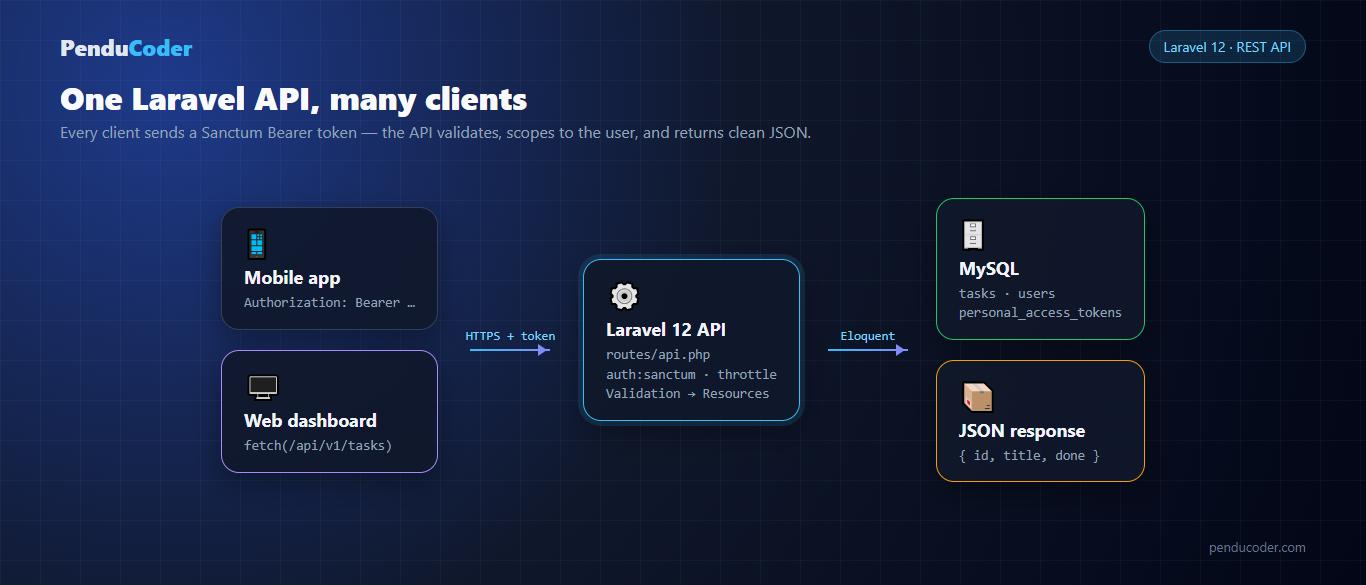
A REST API is how your Laravel backend talks to mobile apps, JavaScript frontends, and other services. Laravel 12 makes this straightforward: routes, controllers, validation, and token authentication with Sanctum are all built in. This guide shows you how to build a REST API in Laravel 12 step by step: a small, complete API for a task list — the same pattern scales to a real product.
Step 1: Set up the project
composer create-project laravel/laravel task-api
cd task-api
php artisan install:api
install:api sets up Sanctum and the API routes file. In Laravel 12, API routes live in routes/api.php and are automatically prefixed with /api.
Step 2: The model and migration
php artisan make:model Task -m// database/migrations/xxxx_create_tasks_table.php
Schema::create('tasks', function (Blueprint $table) {
$table->id();
$table->foreignId('user_id')->constrained()->cascadeOnDelete();
$table->string('title');
$table->boolean('done')->default(false);
$table->timestamps();
});Step 3: Routes
// routes/api.php
use App\Http\Controllers\TaskController;

Route::middleware('auth:sanctum')->group(function () {
    Route::apiResource('tasks', TaskController::class);
});

Route::post('/login', [AuthController::class, 'login']);
apiResource gives you index, store, show, update and destroy — five routes from one line. The auth:sanctum middleware protects everything except login.
Step 4: The controller
public function index(Request $request)
{
    return TaskResource::collection(
        $request->user()->tasks()->latest()->paginate(15)
    );
}

public function store(Request $request)
{
    $validated = $request->validate([
        'title' => 'required|string|max:255',
    ]);

    $task = $request->user()->tasks()->create($validated);

    return new TaskResource($task);
}
Two habits matter here. First, always scope queries to the logged-in user ($request->user()->tasks()), or one user will see another's data. Second, validate on the server — the API cannot trust the client.
Step 5: API resources
Resources control exactly what JSON leaves your server — no password hashes, no internal fields:
class TaskResource extends JsonResource
{
    public function toArray(Request $request): array
    {
        return [
            'id' => $this->id,
            'title' => $this->title,
            'done' => $this->done,
            'created_at' => $this->created_at->toDateTimeString(),
        ];
    }
}
Step 6: Sanctum token authentication
Sanctum issues a plain-text token on login, and the client sends it as a Bearer token on every request:
public function login(Request $request)
{
    $request->validate([
        'email' => 'required|email',
        'password' => 'required',
    ]);

    $user = User::where('email', $request->email)->first();

    if (! $user || ! Hash::check($request->password, $user->password)) {
        return response()->json(['message' => 'Invalid credentials'], 401);
    }

    return response()->json([
        'token' => $user->createToken('mobile-app')->plainTextToken,
    ]);
}
Tokens can be scoped (createToken('name', ['tasks:read'])) and revoked on logout with $request->user()->currentAccessToken()->delete().
Step 7: Test it
# Login and get a token
curl -X POST http://localhost:8000/api/login \
  -d '{"email":"a@b.com","password":"secret"}' \
  -H "Content-Type: application/json"

# List tasks
curl http://localhost:8000/api/tasks \
  -H "Authorization: Bearer YOUR_TOKEN"
Pagination, filtering and sorting
Real clients never want "all the tasks". Add query parameters so the client can ask for a page, a filter, and an order:
public function index(Request $request)
{
    $query = $request->user()->tasks();

    if ($request->filled('done')) {
        $query->where('done', $request->boolean('done'));
    }

    if ($request->filled('search')) {
        $query->where('title', 'like', '%' . $request->search . '%');
    }

    $sort = $request->get('sort', 'created_at');
    $direction = $request->get('direction', 'desc');

    return TaskResource::collection(
        $query->orderBy($sort, $direction)->paginate(15)
    );
}
Validate the sort column against an allow-list in a real app — never pass a raw request value into orderBy(), or a client can sort by any column, including ones you did not mean to expose. Pagination keeps responses small and fast: returning ten thousand rows to show ten is the API version of the N+1 problem, and our Laravel performance guide covers the database side of the same fix.
Consistent error responses
Clients break when errors change shape. Pick one error format and use it everywhere:
// Validation errors (Laravel does this automatically):
{ "message": "The title field is required.", "errors": { "title": ["The title field is required."] } }

// Not found:
{ "message": "Task not found." }
Use the right HTTP status codes and keep them consistent: 200 for success, 201 for a created resource, 401 for unauthenticated, 403 for forbidden, 404 for not found, 422 for validation errors, and 500 only for genuine server errors. A client that can rely on your status codes can handle failures gracefully instead of guessing.
Common mistakes when building a REST API in Laravel 12
- No rate limiting. Add
throttle:apito your route group, or one client can hammer your API. - Returning models directly. Always use resources, or you will leak fields you did not mean to expose.
- Forgetting authorisation. Authentication says who you are; authorisation says what you may do. Check ownership in every method, or use policies.
- No versioning. Put your routes under
/api/v1from day one, so you can change the API later without breaking existing clients.
Where to go next
From here, the natural next steps are pagination and filtering, file uploads through the API, and background jobs for slow work — our Laravel queues guide covers the last one. When the API is ready for real users, read our VPS deployment guide to put it on a server with HTTPS, which an API handling tokens must always use.
One more habit worth building early: write one test per endpoint before you move on. Laravel's feature tests can hit your API with a token and assert the JSON shape in a few lines, and they catch the regressions that manual curl testing misses — a renamed field, a missing scope, a route that stopped requiring authentication. An API with tests is an API you can change confidently, and that confidence is what turns a tutorial project into a product.
FAQ
Should I use Sanctum or Passport for a Laravel API?
Use Sanctum for your own mobile apps, SPAs and simple token-based APIs — it is lighter and easier to set up. Choose Passport only when you need a full OAuth2 server, for example when third-party apps must request access on behalf of your users.
How should I version my API?
Prefix routes with a version such as /api/v1 from day one. When you need breaking changes, add /api/v2 and keep v1 running until clients have moved.
How do I protect the API from abuse?
Combine authentication, per-route authorization (policies), input validation with Form Requests and rate limiting. Never return more fields than the client needs — API Resources make that easy.