Laravel Livewire lets you build interactive, single-page-app-style interfaces — live search, instant form validation, modals, data tables — using only PHP and Blade. No React, no Vue, no separate API. If you already know Laravel, Livewire is the shortest path from "static pages" to "feels like a modern app".
In this beginner's guide you will learn what Livewire is, how it works behind the scenes, and build two real components step by step: a live search and a validated contact form.
What Livewire actually is
Livewire is a full-stack framework for Laravel. You write a component: a PHP class that holds state (properties) and behaviour (methods), plus a Blade view that displays it. Livewire keeps the two in sync with the browser automatically.
| Traditional Blade | Livewire | Vue / React SPA | |
|---|---|---|---|
| Interactivity | Full page reloads | Partial updates, no reloads | Fully client-side |
| Languages | PHP | PHP (+ optional Alpine.js) | PHP API + JavaScript app |
| API needed? | No | No | Yes |
| Best for | Content pages | Dashboards, admin panels, forms, SaaS | Highly interactive, offline-capable apps |
How it works behind the scenes
- On first load, Laravel renders the component to plain HTML — fast and SEO-friendly.
- When the user types or clicks, Livewire sends a small AJAX request with the component's state and the action.
- The server runs your PHP method, re-renders the Blade view and sends back the HTML.
- Livewire updates only the parts of the page that changed (DOM diffing).
So your logic, validation and database queries stay safely on the server, while the user gets an app-like experience.
Installation
composer require livewire/livewireLivewire automatically injects its JavaScript and styles on pages that use components, so there is usually no extra setup. Create your first component with Artisan:
php artisan make:livewire SearchUsersThis creates two files: app/Livewire/SearchUsers.php (the class) and resources/views/livewire/search-users.blade.php (the view). The examples below use Livewire 3 syntax.
Example 1: Live search in 20 lines
// app/Livewire/SearchUsers.php
namespace App\Livewire;

use App\Models\User;
use Livewire\Component;

class SearchUsers extends Component
{
    public string $search = '';

    public function render()
    {
        $users = User::query()
            ->when($this->search, fn ($q) => $q->where('name', 'like', "%{$this->search}%"))
            ->orderBy('name')
            ->limit(20)
            ->get();

        return view('livewire.search-users', compact('users'));
    }
}
<!-- resources/views/livewire/search-users.blade.php -->
<div>
<input type="search" wire:model.live.debounce.300ms="search" placeholder="Search users...">
<div wire:loading>Searching...</div>
<ul>
@forelse ($users as $user)
<li wire:key="user-{{ $user->id }}">{{ $user->name }} — {{ $user->email }}</li>
@empty
<li>No users found.</li>
@endforelse
</ul>
</div>Use it in any Blade page:
<livewire:search-users />What is happening: wire:model.live binds the input to the $search property and sends updates as you type; .debounce.300ms waits until the user pauses so you do not hit the server on every keystroke; wire:loading shows while a request is in flight; and wire:key helps Livewire track list items correctly. Note the root element: every Livewire view must have exactly one root <div>.
Example 2: A contact form with real-time validation
// app/Livewire/ContactForm.php
namespace App\Livewire;

use App\Models\Message;
use Livewire\Attributes\Validate;
use Livewire\Component;

class ContactForm extends Component
{
    #[Validate('required|min:3')]
    public string $name = '';

    #[Validate('required|email')]
    public string $email = '';

    #[Validate('required|min:10|max:2000')]
    public string $body = '';

    public bool $sent = false;

    public function save(): void
    {
        $data = $this->validate();
        Message::create($data);
        $this->reset(['name', 'email', 'body']);
        $this->sent = true;
    }

    public function render()
    {
        return view('livewire.contact-form');
    }
}
<div>
@if ($sent)
<p>Thanks! We will reply soon.</p>
@endif
<form wire:submit="save">
<input wire:model.blur="name" placeholder="Name">
@error('name') <span>{{ $message }}</span> @enderror
<input wire:model.blur="email" type="email" placeholder="Email">
@error('email') <span>{{ $message }}</span> @enderror
<textarea wire:model.blur="body" placeholder="Message"></textarea>
@error('body') <span>{{ $message }}</span> @enderror
<button type="submit" wire:loading.attr="disabled">Send</button>
</form>
</div>With wire:model.blur, each field is validated as soon as the user leaves it, and the #[Validate] attributes keep rules next to the properties they protect. The submit button disables itself while saving, preventing double submissions.
Directives you will use every day
| Directive | What it does |
|---|---|
wire:model | Binds an input to a property (synced on the next action). |
wire:model.live | Syncs while typing — use with .debounce. |
wire:model.blur | Syncs when the field loses focus. |
wire:click="method" | Calls a PHP method on click. |
wire:submit="method" | Handles a form submit without reloading. |
wire:loading | Shows or hides elements during requests. |
wire:poll.10s | Refreshes the component every 10 seconds. |
wire:navigate | SPA-style page navigation on links. |
Security: what beginners must know
- Public properties can be changed by the user. Anything in a public property travels to the browser and back, so never trust it blindly. Use
#[Locked]for IDs the user must not change, and authorise actions in your methods. - Every public method is callable from the browser. Check permissions inside methods like
delete()— for example$this->authorize('delete', $post);. - Do not put secrets in public properties, such as API keys or other users' data.
Performance tips
- Use
.debounceor.blurinstead of syncing on every keystroke. - Keep public properties small; pass large collections to the view from
render()or use#[Computed]properties instead of storing them as state. - Paginate with the
WithPaginationtrait instead of loading thousands of rows. - Use
wire:keyin loops to avoid odd rendering bugs.
When not to use Livewire
Livewire needs a server round-trip for most interactions, so it is not ideal for offline-first apps, real-time drawing or games, or very latency-sensitive UIs for users on slow connections. For small client-only behaviour (toggling a dropdown), use Alpine.js, which ships alongside Livewire.
FAQ
Is Livewire good for SEO?
Yes. The first render is normal server-side HTML, so search engines see the full content.
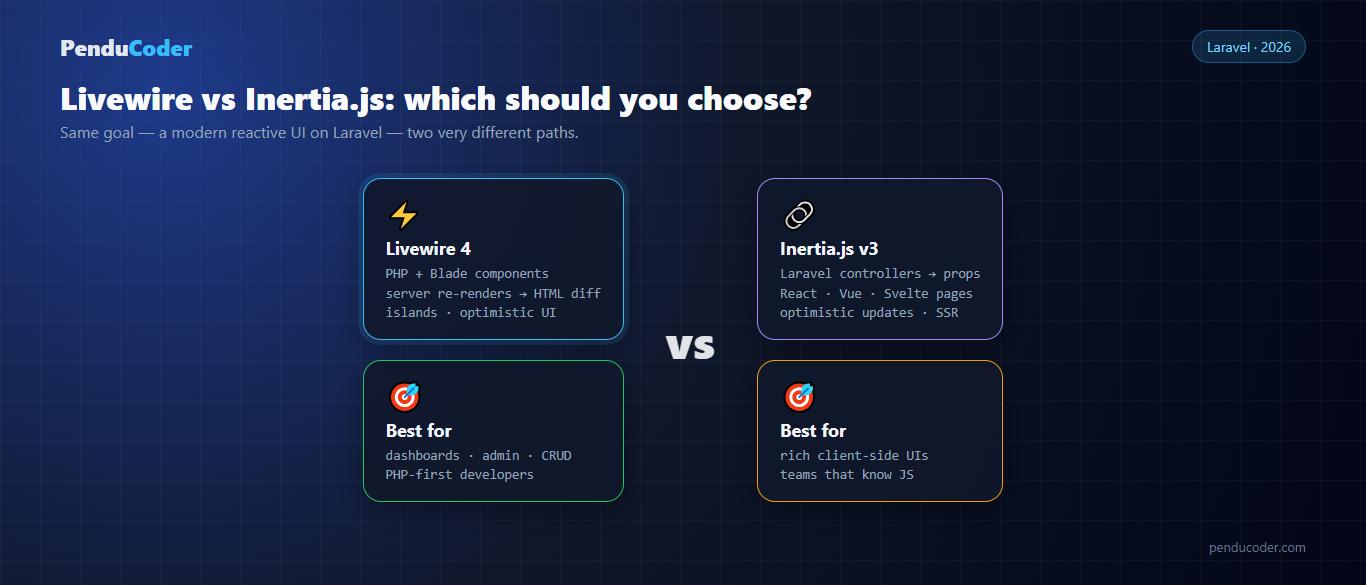
Livewire or Inertia.js?
Choose Livewire if you want to stay in PHP and Blade. Choose Inertia if your team prefers writing the front end in Vue or React while keeping Laravel routing.
Can I build a whole admin panel with Livewire?
Yes — Filament, one of the most popular Laravel admin panel builders, is built on Livewire.
Next steps
Build the live search above against your own users table, then add pagination. Still deciding on a backend? Read Laravel vs Node.js. Ready to go live? Follow our Laravel VPS deployment guide, and grab useful pieces like the Eloquent search scope snippet.