A price tracker is the perfect first web-scraping project: it is useful from day one, it teaches the whole scraping pipeline, and it runs itself once scheduled. This guide builds a Python web scraper with requests and BeautifulSoup — it checks a product page, compares the price with the last check, and emails you when the price drops.
Before you start: scrape politely
Scraping sits in a grey area, so build good habits from the first script:
- Check the site's
robots.txtand terms of service first. If scraping is forbidden, don't. - Use a real User-Agent so the site knows who you are.
- Wait between requests — one second is a polite minimum.
- Never collect personal data, and never hammer a site with parallel requests.
- Practise on
books.toscrape.com, a sandbox site built for learning scraping.
This is general guidance, not legal advice. For commercial use, get permission.
Step 1: Install and fetch a page
pip install requests beautifulsoup4import requests
HEADERS = {"User-Agent": "PriceTracker/1.0 (learning project)"}
def fetch(url):
response = requests.get(url, headers=HEADERS, timeout=15)
response.raise_for_status()
return response.textStep 2: Extract the price with BeautifulSoup
Open the page in your browser, right-click the price, choose Inspect, and note its selector. Then:
from bs4 import BeautifulSoup

def get_price(html):
    soup = BeautifulSoup(html, "html.parser")
    tag = soup.select_one(".price")  # change to the real selector
    text = tag.get_text(strip=True)
    return float(text.replace("$", "").replace(",", ""))
select_one() uses the same CSS selectors you already know from browser DevTools.
Step 3: Remember the last price
A JSON file is enough for one product:
import json
from pathlib import Path

STATE = Path("state.json")

def load_state():
    return json.loads(STATE.read_text()) if STATE.exists() else {}

def save_state(state):
    STATE.write_text(json.dumps(state, indent=2))
Step 4: Alert on a price drop
import smtplib
from email.message import EmailMessage

def send_alert(product, old, new, url):
    msg = EmailMessage()
    msg["Subject"] = f"Price drop: {product} ${old} -> ${new}"
    msg["From"] = "tracker@example.com"
    msg["To"] = "you@example.com"
    msg.set_content(f"{product} dropped from ${old} to ${new}.\n{url}")
    with smtplib.SMTP("localhost") as server:
        server.send_message(msg)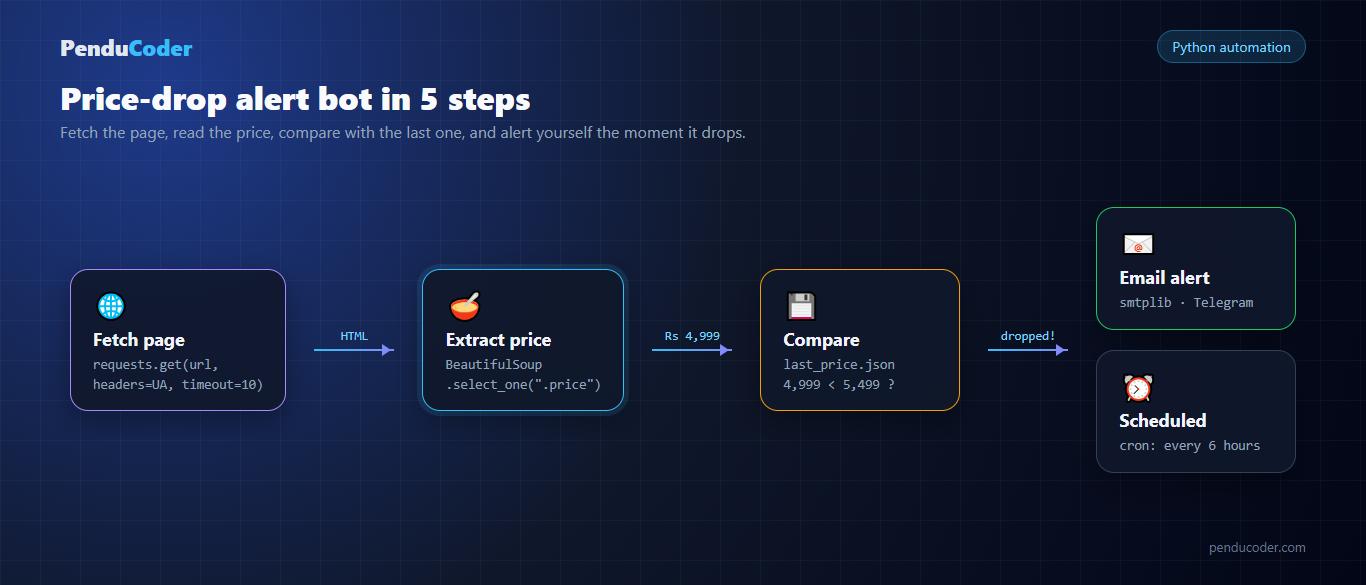
Step 5: Put it together and schedule it
def check(url, product):
    state = load_state()
    price = get_price(fetch(url))
    old = state.get(url)

    if old is not None and price < old:
        send_alert(product, old, price, url)
        print(f"DROP: {product} ${old} -> ${price}")
    else:
        print(f"{product}: ${price} (no drop)")

    state[url] = price
    save_state(state)

if __name__ == "__main__":
    check("https://books.toscrape.com/catalogue/a-light-in-the-attic_1000/index.html",
          "A Light in the Attic")
Then schedule it — cron on Linux, Task Scheduler on Windows:
# Run every morning at 9:00
0 9 * * * cd /home/you/price-tracker && python tracker.py
Follow pagination: check every page
Most product listings span many pages. Find the "next" link and follow it until it disappears:
from urllib.parse import urljoin

def scrape_all(start_url, max_pages=5):
    url, results = start_url, []
    for _ in range(max_pages):
        soup = BeautifulSoup(fetch(url), "html.parser")
        for card in soup.select(".product_pod"):
            results.append({
                "title": card.h3.a["title"],
                "price": card.select_one(".price_color").get_text(strip=True),
            })
        next_link = soup.select_one(".next a")
        if not next_link:
            break
        url = urljoin(url, next_link["href"])
        time.sleep(1)  # be polite: one second between pages
    return results
The time.sleep(1) is not optional politeness — it is what keeps your IP from being blocked. A scraper that fires ten requests a second looks like an attack.
Store results in a database, not just a file
A JSON state file works for one product. For many products, a tiny SQLite database is simpler than it sounds and makes price history easy to query:
import sqlite3

db = sqlite3.connect("prices.db")
db.execute("""
    CREATE TABLE IF NOT EXISTS prices (
        url TEXT, price REAL, checked_at TEXT
    )
""")

def record_price(url, price):
    db.execute(
        "INSERT INTO prices VALUES (?, ?, datetime('now'))",
        (url, price),
    )
    db.commit()

def last_price(url):
    row = db.execute(
        "SELECT price FROM prices WHERE url = ? ORDER BY checked_at DESC LIMIT 1",
        (url,),
    ).fetchone()
    return row[0] if row else None
With history stored, the alert logic stays the same — compare today's price with the last recorded one — but you can also answer new questions: how often does this product drop, and by how much? A chart of that history is a genuinely useful page to build next.
What to learn next after your first Python web scraper
This project is a template for most scraping work: fetch, parse, compare, store, alert. The same pipeline powers job-board monitors, stock checkers and news digests. If a page loads its content with JavaScript, BeautifulSoup alone cannot see it — that is when you reach for Playwright or Selenium. And if you want more automation ideas, our Python automation projects guide lists ten weekend-sized projects, including the file organizer in Article 8 of this pack.
One last habit: keep a small log of every check — date, product, price, and whether an alert fired. When a site changes its layout and your selector silently returns nothing, the log is what tells you the scraper has been broken for a week instead of working. A scraper you never check is a scraper you cannot trust, and the log costs three lines to add.
FAQ
Is web scraping legal?
Scraping publicly available data is often allowed, but it depends on the website's terms, the data and the law in your country. Check the terms and robots.txt, avoid personal data, and keep your request rate low.
Why does my scraper return empty results?
Many sites load prices with JavaScript after the page loads. Look in your browser's DevTools Network tab for the underlying API request, or use a browser automation tool such as Playwright.
How often should the scraper run?
For price alerts, a few times a day is enough. Running every minute risks getting blocked and puts unnecessary load on the site.